Component Groups
Version 1.02 · updated January 2022 All versions
Component Groups lets you bundle any set of components into a named, reusable group — a power section, an RF front end, a bank of connectors, a daughtercard’s worth of parts — and then act on that whole set as one. Select the components once, give the group a name, and you can recall it any time without hunting and re-selecting part by part.
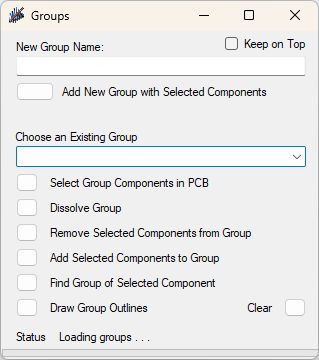
Groups are ad-hoc: you decide what belongs together, for whatever reason makes sense to your design. Once a group exists, a compact panel gives you one-click actions:
- Select Group Components in PCB — instantly reselect every component in a group, ready to move, place, or edit as a unit.
- Add / Remove Selected Components — grow or prune a group as the design evolves.
- Find Group of Selected Component — pick a part and ask which group it belongs to.
- Dissolve Group — drop a group definition you no longer need; the components stay, only the grouping goes away.
- Draw Group Outlines — outline each group on a user layer of your choosing, so functional blocks are visible at a glance for placement reviews or documentation. Clear removes those outlines again.
Your groups are saved to a file and reload automatically the next time you open the tool, so the organization you set up sticks from session to session.
A Keep on Top option holds the panel above the layout while you work.
It earns its keep on any board with natural functional blocks you touch repeatedly — letting you operate on “the power supply” or “the RF section” as a single named thing instead of re-selecting the same handful of parts over and over.